

URL: https://api.gemina.co/api/v1/mcp/

Grok Bot shares Cursor's MCP configuration — there is no URL field in Grok Bot itself.

1. Add Gemina in Cursor — see the Cursor card. No headers.
2. Teams: a Cursor admin enables it on the team plugins page, and adds the
   URL to the MCP allowlist if the team uses one.
3. In Grok Bot, open Settings -> Plugins and enable Gemina.
4. Sign in when prompted. Authentication is shared with Cursor.Let agents work with business documents.
The Gemina MCP server: 13 tools to tag, extract, search, total and index — on one hosted endpoint. Sign in with OAuth from almost any host, or use an API key.
Connect
Two ways in. One server.
Sign in from the app you already use, or paste an API key into a config file. Every snippet points at the same endpoint.
Hosted endpoint
https://api.gemina.co/api/v1/mcp/Sign in from your app (OAuth)
RecommendedNo key to copy. Add the server, sign in when your browser opens, and the host keeps its own credential — every host below works this way.

mcp_servers:
  gemina:
    url: "https://api.gemina.co/api/v1/mcp/"
    auth: oauth
openclaw mcp set gemina '{"url":"https://api.gemina.co/api/v1/mcp/","transport":"streamable-http","auth":"oauth"}'
openclaw mcp login gemina
URL: https://api.gemina.co/api/v1/mcp/

1. Customize → Connectors
2. Add → Add custom connector
3. Paste the URL
4. Sign in
claude mcp add --transport http gemina https://api.gemina.co/api/v1/mcp/
# then run /mcp and sign in
codex mcp add gemina --url https://api.gemina.co/api/v1/mcp/
codex mcp login gemina
{
  "mcpServers": {
    "gemina": {
      "url": "https://api.gemina.co/api/v1/mcp/"
    }
  }
}
gemini mcp add --transport http gemina https://api.gemina.co/api/v1/mcp/
{
  "servers": {
    "gemina": {
      "type": "http",
      "url": "https://api.gemina.co/api/v1/mcp/"
    }
  }
}
grok mcp add --transport http gemina https://api.gemina.co/api/v1/mcp/
{
  "mcpServers": {
    "gemina": {
      "serverUrl": "https://api.gemina.co/api/v1/mcp/"
    }
  }
}
URL: https://api.gemina.co/api/v1/mcp/

1. Settings -> Security and login -> turn on Developer mode
2. Go to chatgpt.com/plugins and select +
3. Name it "Gemina" and paste the URL above under Connection
4. Create, then sign in to Gemina when ChatGPT prompts
URL: https://api.gemina.co/api/v1/mcp/

1. Add the MCP Client Tool node (under an AI Agent), or MCP Client for a plain step
2. MCP Endpoint URL: paste the URL above
3. Server Transport: HTTP Streamable
4. Authentication: MCP OAuth2
5. Credentials -> create an "MCP OAuth2 API" credential; leave Dynamic Client Registration on and Resource URL empty
6. Click sign in, approve Gemina in the browser, then set Tools to Include
URL: https://api.gemina.co/api/v1/mcp/

1. In your agent: Tools -> Add a tool -> New tool -> Model Context Protocol
2. Server name: Gemina
3. Server URL: paste the URL above
4. Authentication: OAuth 2.0 -> Type: Dynamic discovery
5. Create -> Create a new connection -> Add to agent
URL: https://api.gemina.co/api/v1/mcp/

1. Apps -> + Add connection -> MCP Client -> Add connection
2. Server URL: paste the URL above
3. Transport: Streamable HTTP
4. OAuth: Yes (leave Bearer Token blank)
5. Continue, then sign in to Gemina in the tab that opens
npx @modelcontextprotocol/inspector \
  --server-url https://api.gemina.co/api/v1/mcp/ \
  --transport http

# Open the printed URL (it carries a one-time session token), then click Connect.
# Gemina answers 401, the Inspector discovers the authorization server,
# registers itself and opens your browser to sign in.Paste an API key
HeadlessNo browser? Paste an API key instead. Same server, same tools — for headless agents, CI, and shared machines.
URL: https://api.gemina.co/api/v1/mcp/

Grok Bot shares Cursor's MCP configuration — there is no URL field in Grok Bot itself.

1. Add Gemina in Cursor with the X-API-Key header — see the Cursor card.
2. Teams: a Cursor admin enables it on the team plugins page, and adds the
   URL to the MCP allowlist if the team uses one.
3. In Grok Bot, open Settings -> Plugins and enable Gemina.
4. The key travels with the Cursor entry; nothing to paste in Grok Bot.mcp_servers:
gemina:
url: "https://api.gemina.co/api/v1/mcp/"
headers:
X-API-Key: "<paste-your-key-here>"openclaw mcp set gemina '{"url":"https://api.gemina.co/api/v1/mcp/","transport":"streamable-http","headers":{"X-API-Key":"<paste-your-key-here>"}}'{
"mcpServers": {
"gemina": {
"command": "npx",
"args": [
"-y",
"mcp-remote",
"https://api.gemina.co/api/v1/mcp/",
"--header",
"X-API-Key:${GEMINA_API_KEY}"
],
"env": {
"GEMINA_API_KEY": "<paste-your-key-here>"
}
}
}
}claude mcp add --transport http gemina https://api.gemina.co/api/v1/mcp/ \
--header "X-API-Key: <paste-your-key-here>"[mcp_servers.gemina]
url = "https://api.gemina.co/api/v1/mcp/"
http_headers = { "X-API-Key" = "<paste-your-key-here>" }{
"mcpServers": {
"gemina": {
"url": "https://api.gemina.co/api/v1/mcp/",
"headers": {
"X-API-Key": "<paste-your-key-here>"
}
}
}
}gemini mcp add --transport http \
--header "X-API-Key: <paste-your-key-here>" \
gemina https://api.gemina.co/api/v1/mcp/{
"servers": {
"gemina": {
"type": "http",
"url": "https://api.gemina.co/api/v1/mcp/",
"headers": {
"X-API-Key": "<paste-your-key-here>"
}
}
}
}grok mcp add --transport http gemina https://api.gemina.co/api/v1/mcp/ \
--header "X-API-Key: <paste-your-key-here>"{
"mcpServers": {
"gemina": {
"serverUrl": "https://api.gemina.co/api/v1/mcp/",
"headers": {
"X-API-Key": "<paste-your-key-here>"
}
}
}
}
{
  "mcpServers": {
    "gemina": {
      "type": "streamableHttp",
      "url": "https://api.gemina.co/api/v1/mcp/",
      "headers": {
        "X-API-Key": "<paste-your-key-here>"
      }
    }
  }
}URL: https://api.gemina.co/api/v1/mcp/
1. Add the MCP Client Tool node (under an AI Agent), or MCP Client for a plain step
2. MCP Endpoint URL: paste the URL above
3. Server Transport: HTTP Streamable
4. Authentication: Header Auth -> Name: X-API-Key, Value: <paste-your-key-here>
5. Set Tools to Include (All, or a subset)URL: https://api.gemina.co/api/v1/mcp/
1. In your agent: Tools -> Add a tool -> New tool -> Model Context Protocol
2. Server name: Gemina
3. Server URL: paste the URL above
4. Authentication: API key -> Type: Header -> Name: X-API-Key
5. Create -> Create a new connection (paste <paste-your-key-here>) -> Add to agentURL: https://api.gemina.co/api/v1/mcp/
1. Apps -> + Add connection -> MCP Client -> Add connection
2. Server URL: paste the URL above
3. Transport: Streamable HTTP
4. OAuth: No
5. Bearer Token: <paste-your-key-here>curl https://api.openai.com/v1/responses \
-H "Content-Type: application/json" \
-H "Authorization: Bearer $OPENAI_API_KEY" \
-d '{
"model": "gpt-5.6",
"input": "Extract the totals from the invoice I uploaded.",
"tools": [{
"type": "mcp",
"server_label": "gemina",
"server_url": "https://api.gemina.co/api/v1/mcp/",
"headers": { "X-API-Key": "<paste-your-key-here>" },
"require_approval": "never"
}]
}'npx @modelcontextprotocol/inspector \
--server-url https://api.gemina.co/api/v1/mcp/ \
--transport http \
--header "X-API-Key: <paste-your-key-here>"
# Open the printed URL (it carries a one-time session token), then click Connect.
curl -X POST https://api.gemina.co/api/v1/mcp/ \
  -H "Content-Type: application/json" \
  -H "Accept: application/json, text/event-stream" \
  -H "X-API-Key: <paste-your-key-here>" \
-d '{"jsonrpc":"2.0","id":1,"method":"initialize","params":{"protocolVersion":"2025-03-26","capabilities":{},"clientInfo":{"name":"curl","version":"1"}}}'The tools
13 tools, in three groups.
Names and descriptions come straight from the published manifest, so this page and the server never disagree.
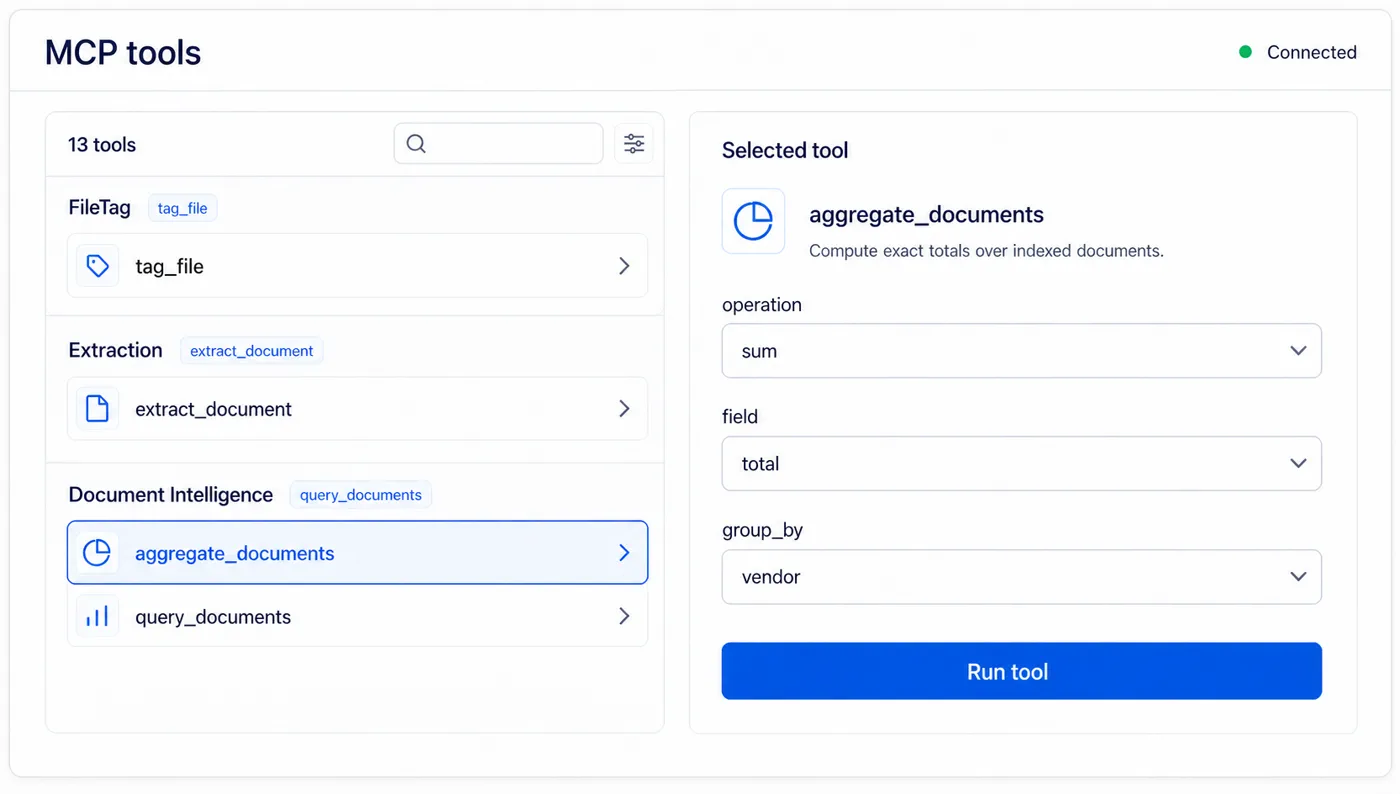
FileTag
3 toolsTag, rename, and enrich any PDF or image. Free tier, no credit card.
files_create_uploadReserve a pre-signed PUT slot for a file the agent holds locally, then follow the returned next_tool_call recipe — tag_file by default, extract_document when purpose='extract'. One slot type: any slot works with either tool. Bytes go straight from the agent host to storage and never traverse the LLM context.tag_fileRun the FileTag pipeline against a previously uploaded slot. Returns extracted metadata, a suggested filename, six filename patterns, and a short-lived signed URL to an enriched copy with the metadata embedded in document properties or EXIF.tag_urlFetch a public HTTPS URL server-side under strict SSRF guards and run the FileTag pipeline on it. Same result shape as tag_file; the bytes never traverse the LLM context.
Extraction
7 toolsTyped extraction over invoices, Hebrew documents, line items, raw OCR, and custom templates.
extract_documentRun typed extraction on an uploaded slot from files_create_upload. Choose extraction_types: invoice_headers, invoice_line_items, custom_template, ocr (runs only on the praetorian model), or the legacy document_details_hebrew / document_line_items_hebrew (praetorian only, not recommended). Model choice is a recommendation, not a rule: velox for headers, invictus with thinking for line items. Asynchronous — returns the result directly or a correlationId to poll. Thinking, evaluation, correction, and coordinate toggles mirror the REST API.get_extraction_resultPoll for the result of an asynchronous extract_document call using its correlationId. Returns the completed extraction, or an in-process status to poll again.list_extractionsList past extractions, newest first. Filter by external_id, end_user_id, or an ISO date window, and paginate with skip and limit.get_extractionFetch one extraction by id, including the full extracted data.get_documentFetch one document by id, including all of its extractions.add_document_extractionsRun more extraction types on a document Gemina already stores — no re-upload. Pass the document id (from tag_file, extract_document, or get_document) and the extraction_types; paid per extraction like an upload. Two modes: leave wait at its default to hold the call and read the values in the same turn (poll pollCorrelationId with get_extraction_result), or pass wait=false to return at once when you only need the document filed for later search — the extraction still runs to completion and its outcome stays visible in get_document / list_extractions. Both modes cost the same. Every structured type (not plain OCR) is also submitted for indexing, so the document becomes answerable by query_documents and aggregate_documents; indexing is opt-in, plan-gated and best-effort. A pending upload slot (gfile_…) is not a document id.submit_extraction_feedbackSubmit verified or corrected field values for a completed extraction and get back a per-field comparison summary. Each extraction accepts feedback once.
Document Intelligence
3 toolsAsk questions and run spend analytics across the tenant's indexed documents — search and compute exact totals, no re-upload.
query_documentsAsk across your whole indexed collection, no re-upload. Search in structured mode (exact field filters), semantic mode (natural-language similarity over extracted fields and FileTag metadata, not raw body text), or hybrid mode (keyword and semantic fused with Reciprocal Rank Fusion, the best default). Returns matched documents with their extracted fields; semantic and hybrid modes also return relevance scores.aggregate_documentsSpend analytics with no export: compute sums, averages, minimums, maximums, and counts over your indexed documents, grouped by vendor, currency, document type, expense type, payment method, end user, month, or year — e.g. total spent per vendor last quarter. Counts are per document (re-uploads collapse on a full identity match). Money metrics are always split per currency unless a currency filter is given, so totals are never mixed.index_documentManually (re)index one document into the searchable index — after corrections, or to backfill a document processed before indexing was enabled. Documents are otherwise submitted for indexing automatically for FileTag and structured extractions once the tenant enables it — plain OCR is not indexed, and a document can be skipped (e.g. no extractable fields or no indexing credits).
Discovery
Look before you sign up.
A read-only mount answers tools/list with no credentials, so registries and clients can see what Gemina offers before anyone creates an account.
curl -X POST https://api.gemina.co/api/v1/mcp/public/ \
  -H "Content-Type: application/json" \
  -d '{"jsonrpc":"2.0","id":1,
       "method":"tools/list","params":{}}'
Authenticated endpoint
Running a tool goes to https://api.gemina.co/api/v1/mcp/. Sign in with OAuth 2.1 from Claude Code, claude.ai or Claude Desktop, or send an API key as a bearer token or X-API-Key.
Machine-readable manifest
/.well-known/mcp.json describes the server, its auth, its file limits and every tool.
Works with any MCP host
Claude Desktop, Cursor, Claude Code, VS Code, Cline, Windsurf, OpenClaw and others.
A worked example
Documents in. A cited answer out.
Four steps an agent can run on its own.
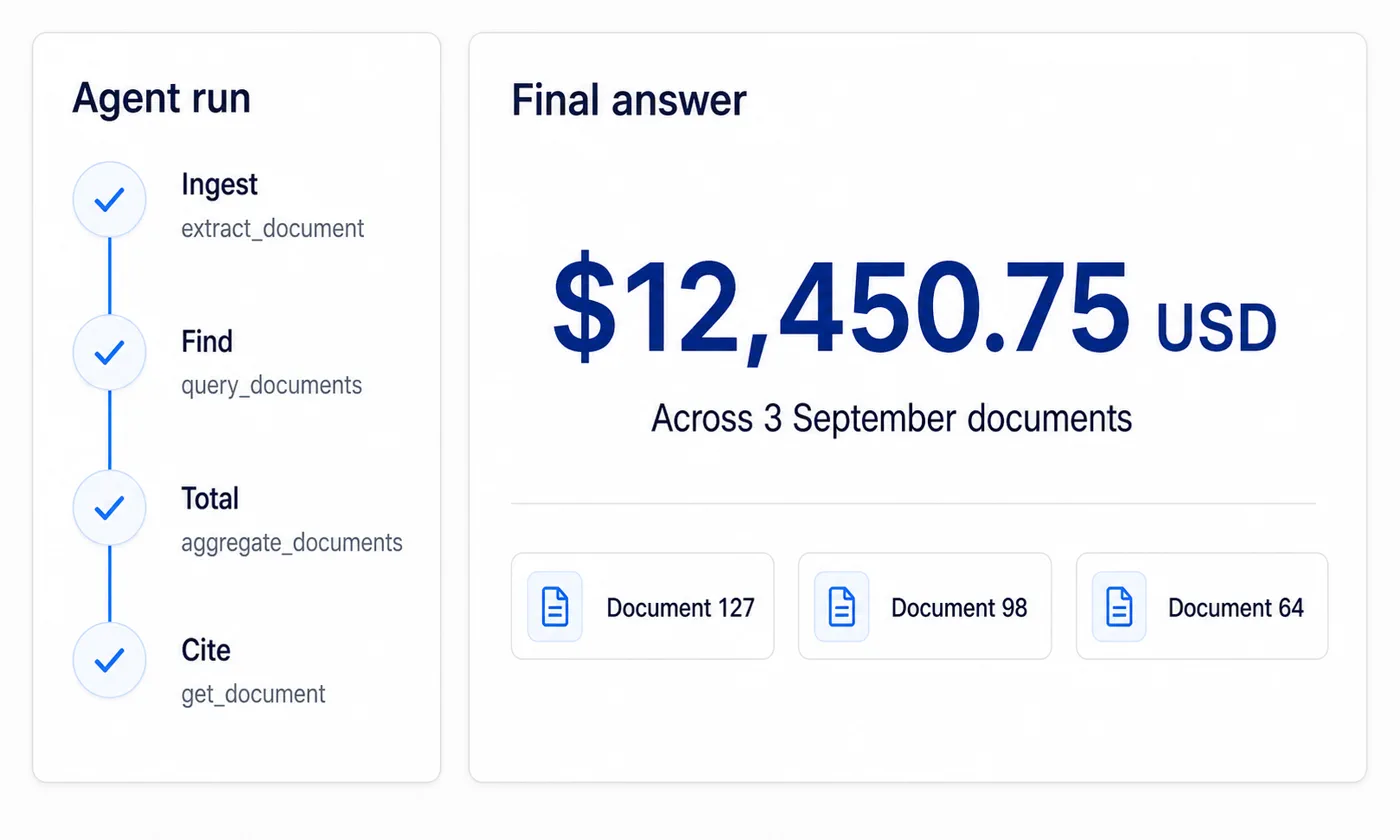
- 1
Ingest
Reserve an upload slot, put the bytes there, and run typed extraction. The document never passes through the model context. To add more extraction types to it later, add_document_extractions re-extracts the stored document — no re-upload.
files_create_upload, extract_document - 2
Find
Search the tenant’s indexed collection by field, by meaning, or both at once.
query_documents - 3
Total
Compute sums and counts in the database, grouped by vendor, currency, month, or type.
aggregate_documents - 4
Cite
Fetch the documents behind the numbers so the agent can show its working.
get_document, get_extraction
Worth knowing
Chat is not one of the tools.
Agents get search, aggregation and indexing over MCP. Chat is not on that list. It runs over REST and the SDKs instead. A conversation carries state from one turn to the next, and an MCP tool call is stateless.
So an agent that wants a conversational answer composes one itself, from query_documents and aggregate_documents. That is usually what you want anyway. The agent keeps control of the reasoning.
Connect an agent in a minute.
1,500 free FileTag calls a month. No credit card.